
Technology
How Industrial Teams Build Visual Records and Where an AI Image Generator Helps

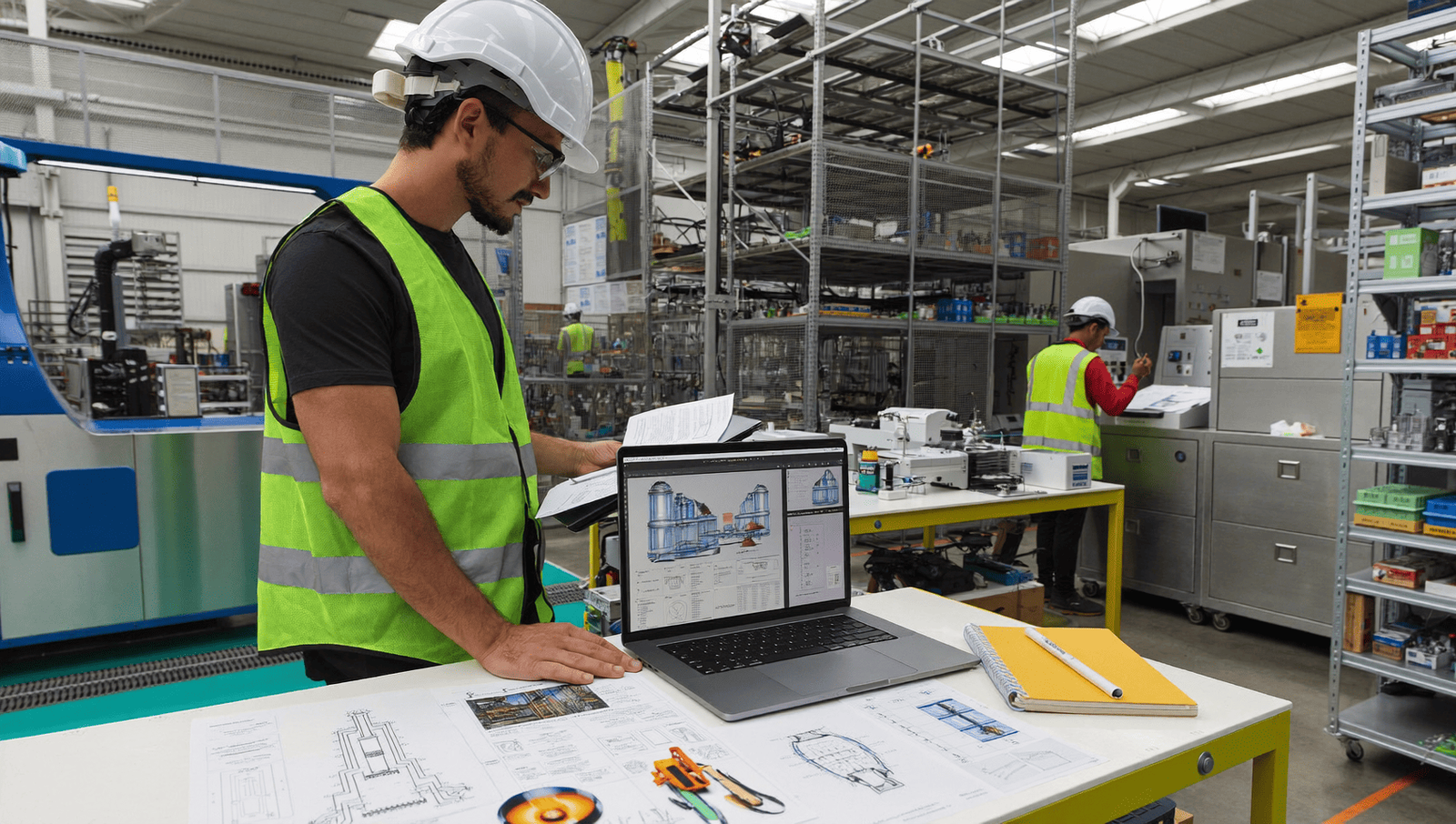
The most expensive photograph on an industrial site is the one nobody took.
A forklift makes contact with a rack leg. Nobody photographs it. Six weeks later the rack is inspected, the damage is found, and there is no record of when it happened, who was operating, or whether anything was reported. The investigation becomes a conversation about memory.
The same gap shows up in contractor disputes, insurance claims, carrier damage, regulatory inspections and training. In every case the question is what did it actually look like, and in most cases nobody knows.
Phones make this trivially cheap, and almost nobody has a habit around it. An AI Image Generator from Higgsfield, is useful in this environment for exactly one thing, and there are three places it must not go.
What Needs Photographing Routinely?
More than most sites capture, at moments nobody currently thinks about.
- Pre-shift inspections, particularly anything flagged
- Damage, immediately, whoever caused it
- Deliveries on arrival, before anything is unloaded
- Completed maintenance, showing what was done
- Conditions before contractors start and after they finish
The delivery photograph is the cheapest money an operation can save. Damage discovered after a truck leaves is a dispute, and damage photographed on the tailgate is a claim.
The contractor case works the same way. A site photographed before an external crew arrives and again when they leave removes an entire category of argument about who caused what.
An AI Image Generator plays no part in any of this. These are records.
What Must Never Be Altered?
Anything that could become evidence.
- Never edit an incident photograph, in any way
- Never adjust a damage record to look better or worse
- Never alter a date on any file
- Never produce an image of a condition or an event
- Never let an AI Image Generator near documentation
Incident photographs can end up in insurance claims, regulatory proceedings and litigation. An altered image in that context is a considerably larger problem than whatever it was meant to improve.
Correcting exposure on a dark photograph is the only acceptable adjustment, and even that is worth documenting. Keep the original untouched alongside anything brightened.
The rule is simple enough to put on a training slide: if it records something that happened, nobody edits it, ever.
Can Safety Signage Be Produced?
No, and this is the one people try.
Safety signage follows published standards. In the United States that generally means the ANSI Z535 family, and internationally ISO 7010, both of which define exact pictograms, color values, header formats and signal word usage.
What goes wrong with a produced sign:
- Pictograms that look right and are not the standard symbol
- Colors outside the specified range, which matters for recognition
- Incorrect signal words or wrong header formatting
- Proportions and borders that do not match
- An AI Image Generator sign that passes a glance and fails an inspection
The failure is not cosmetic. Standardized symbols work because they are identical everywhere, so a worker recognizes them without reading. A near-miss symbol breaks that, and in an emergency the half second matters.
Buy compliant signage from a supplier who certifies it. It costs very little and it is one of the few things on a site with a single right answer.
Where Does an AI Image Generator Legitimately Help?
Training illustration, which is genuinely hard to source otherwise.
- Procedure sequences, showing steps in order
- Correct against incorrect technique, side by side
- Cutaway and schematic views of equipment
- Process flow illustration, for induction material
- Concept visuals for layout or planning discussions
The correct-against-incorrect pairing is the strongest use. Photographing somebody doing something unsafe to illustrate what not to do is awkward and sometimes genuinely unsafe, and an illustration solves it.
The sequence case matters because photographs of a process rarely show the step clearly. A simplified illustration removes the background clutter that makes a real workshop photograph hard to read.
Have an experienced operator check every illustration before it goes into training. A plausible-looking diagram with the sequence wrong teaches the wrong thing to people whose safety depends on it.
What Makes Training Material Actually Work?
Simplicity, sequence and checking.
- One step per image, never three
- Show the hands and the contact point, which is where technique lives
- Remove background clutter, since it competes
- Number the steps clearly
- Verify against the written procedure, line by line
The verification step is non-negotiable in an industrial context. A training illustration is instruction, and an AI Image Generator producing something that contradicts the procedure creates a documented conflict between two things the company published.
Have the person who actually does the job review it. They will find the error in thirty seconds that nobody else noticed.
Date the material and record who approved it. Training records are audited, and an undated illustration with no named approver is a finding waiting to happen.
Does Shift Handover Benefit From This?
Considerably, and it is the easiest place to start because the habit already half exists.
Handover is where information is lost daily. A verbal account at the end of twelve hours, delivered by somebody who wants to leave, to somebody who has not caught up yet.
What photographs add:
- The thing itself, rather than a description of it
- A record that survives both people forgetting
- Context for the next shift, who can see rather than imagine
- Evidence of when something started, which matters later
- No AI Image Generator involvement, since this is observation
The started-when question is the one that recurs. A fault reported on Thursday that somebody photographed on Monday is a different conversation from one nobody can date.
A shared album per line or per area works better than a formal system, because people will actually use it. Formality is what kills handover documentation.
Keep it to things that matter. An album of everything is an album nobody reads, and the whole point is the exceptions.
How Should Photographs Be Captured?
Consistently, with enough context to be useful later.
- Wide first, showing where it is
- Then close, showing what it is
- Include a scale reference where size matters
- Capture the identifying number on the asset, which no AI Image Generator can supply later
- Take more angles than feel necessary, since you cannot go back
The asset number is the detail that makes a photograph findable. An image of a damaged rack is useless without knowing which rack, and the label is usually in frame if somebody thought to include it.
Phones are adequate for almost all of this. Lighting is the usual constraint in a warehouse, and a photograph taken with the overhead lights on and the flash off is generally better than the reverse.
Film a short clip where movement or sound matters. Intermittent faults and unusual noises are considerably easier to show than to describe to a maintenance engineer who was not there.
Why Does Damage Documentation Matter So Much?
Because the cost of downtime is rarely the repair.
The visible cost of an incident is parts and labor. The real cost sits in the production that did not happen, the overtime to catch up, the missed shipments and the customers who noticed, as any analysis of what forklift downtime actually costs makes clear.
Photographic records change that calculation in specific ways:
- Patterns become visible when damage is logged with images
- Recurring causes surface, such as one corner everybody clips
- Operator training needs become evident rather than suspected
- Claims are settled faster with images attached
- Preventive cases get approved, since a photograph persuades where a memo does not
The pattern point is the valuable one. Three photographs of the same rack leg over a year is an argument for a guard rail that no amount of describing it will produce.
Log it with the image attached. A maintenance record reading rack damaged tells you nothing at all in March.
How Should the Records Be Stored?
Somewhere findable by asset and date, not on individual phones.
- Name by asset number and date outside Higgsfield, consistently
- Store centrally, not on a device somebody takes home
- Keep incident images separately from any AI Image Generator material, and untouched
- Store the Higgsfield training project apart from records
- Set a retention period for both the records and the Higgsfield files that matches your obligations
The phone problem is universal and quietly serious. A supervisor leaves, and a year of incident photographs leaves with them, which is discovered only at the moment somebody needs one for a claim.
Separating training material from records prevents the mistake that would actually hurt you, which is an illustration ending up in an evidence folder.
Check your retention requirements rather than assuming. Some industries and some insurers specify them.
Does This Apply to Audits and Inspections?
Directly, and prepared sites perform better.
- Photograph corrective actions as they are completed
- Build a visual record of recurring checks
- Keep images with the written records they relate to
- Never produce evidence of anything, under any circumstances
- Keep an AI Image Generator strictly to training and explanatory material
The corrective action photograph is the one auditors appreciate. A finding closed with a note is a claim, and one closed with a dated image is demonstrated.
Inspectors are experienced at distinguishing a system from a scramble assembled the week before. A site that produces dated images on request is visibly operating a process rather than describing one.
The never-produce rule needs no explanation in this context and should still be written into whatever policy covers it.
What About Presentations and Proposals?
The one place latitude genuinely exists.
- AI Image Generator concept visuals for a proposed layout or change
- Illustrative material behind text in a deck
- AI Image Generator diagrams explaining a process to a board
- Before and after AI Image Generator concepts, labeled as concepts
- Nothing depicting your actual site unless photographed
The labeling matters even internally. A concept image of a reconfigured floor presented without that label becomes, three meetings later, something people believe exists.
Capital proposals benefit considerably from visuals, and the honest version works better anyway. A photograph of the actual bottleneck beside a diagram of the proposed fix is more persuasive than any rendering.
What Would Starting This Involve?
A week of habit, then nothing.
- Decide what gets photographed, as a short list
- Tell every shift, including contractors
- Set up one shared location with a naming rule
- Photograph deliveries and damage from Monday
- Produce training illustrations in an AI Image Generator for the two procedures people get wrong
- Have an operator verify each Higgsfield illustration
- Keep the Higgsfield project separate from the records folder
Then review what accumulated after a month and see which patterns showed up that nobody had noticed.
The habit is the whole thing. The storage and the naming are the parts that make the habit worth having a year later.
FAQ’s
What should always be photographed?
Damage immediately, deliveries on arrival, completed maintenance, and conditions before and after contractors work on site.
Can incident photographs be edited?
No. They can end up in claims and proceedings, and an altered image is a larger problem than a dark one. Correct exposure only, keeping the original.
Can an AI Image Generator produce safety signs?
Never. Signage follows ANSI Z535 or ISO 7010, which specify exact symbols and colors, and a near-miss symbol defeats the purpose of standardization.
Where does it genuinely help?
Training illustration, particularly correct against incorrect technique, which is awkward and sometimes unsafe to photograph.
Who should check training illustrations?
Somebody who actually does the job. They find the sequence error in thirty seconds.
Is there a free way to try this?
Higgsfield operates a free tier as part of an AI creative suite, which covers producing illustrations for a couple of procedures.
Conclusion
Industrial sites run on records, and the photographic ones are the cheapest to create and the most frequently missing.
An AI Image Generator belongs in training material and nowhere near documentation, and Higgsfield runs it in a browser for whoever is building the induction pack.
Photograph the damage, photograph the delivery, buy the signage, and have an operator check the diagrams. The habit costs minutes and the gap costs weeks.

The internet is becoming a necessary component of daily life. People use it for communication, online shopping, entertainment, education, business, and accessing information. However, spending time online also comes with privacy and security concerns. Websites may collect browsing information, public Wi-Fi networks can expose sensitive data, and some online services restrict access based on location. This is why virtual private networks (VPNs) have become increasingly popular. A tool such as iTop VPN can help users improve their online privacy while providing a convenient way to explore the internet.
For people who want to explore VPN technology without immediately paying for a subscription, a VPN free option can be a useful starting point. Understanding how these services work and what features they offer can help users make better decisions about their online security.
Understanding How a VPN Protects Your Privacy
A virtual private network creates an encrypted connection between your device and a VPN server. Instead of sending internet traffic directly through your regular connection, a VPN routes it through a selected server. This process helps protect your data from certain types of monitoring and makes your visible IP address appear different from your original one.
Encryption is particularly useful when connecting to public Wi-Fi in places such as airports, hotels, restaurants, and coffee shops. These networks are convenient, but they may not always provide sufficient protection. A VPN adds another layer of security by encrypting supported internet traffic.
However, users should remember that a VPN does not provide complete anonymity or protect against every online threat. Safe browsing habits, strong passwords, and updated software remain important.
What Makes iTop VPN Worth Exploring?
iTop VPN is designed to provide a straightforward VPN experience for people who want additional privacy and flexibility while browsing. Its user-friendly approach makes it suitable for individuals who may not have extensive technical knowledge.
One important consideration when choosing a VPN is ease of use. Complicated settings can make it difficult for beginners to understand how to connect securely. A simple interface allows users to explore available servers, establish connections, and manage their preferences without unnecessary steps.
Another useful consideration is server availability. Different server locations can provide additional flexibility when accessing websites and online services. Depending on the available servers and service conditions, users may be able to connect through locations in different countries.
Exploring a VPN Free Option
Many internet users search for a VPN free service because they want to understand the benefits of a virtual private network before spending money. Free access can make VPN technology more accessible, especially for students, casual browsers, and people who only need occasional protection.
A free VPN option may provide basic connectivity and an opportunity to test the software interface. It can also help new users understand how server selection, connection settings, and encrypted browsing work.
Nevertheless, free services can come with limitations. These may include restricted server locations, connection limits, reduced speeds, or fewer advanced features. Availability and restrictions depend on the provider and its current plans.
When evaluating a free VPN, users should also examine its privacy policy. A trustworthy service should explain how it handles personal information, connection records, and other data. Free access should never mean giving up reasonable privacy protections.
Benefits of Using iTop VPN for Everyday Browsing
There are several reasons why users may consider adding a VPN to their daily internet routine.
1. Additional Connection Privacy
A VPN encrypts supported internet traffic between your device and the VPN server. This can make it more difficult for others on the same local network to inspect your browsing activity. It is particularly useful when using unfamiliar public Wi-Fi connections.
2. Flexible Server Connections
Server selection is another important VPN feature. Connecting through different server locations can help users access location-dependent online content, subject to the relevant website’s rules and restrictions.
3. A Beginner-Friendly Experience
A straightforward interface can make a significant difference for first-time VPN users. Instead of dealing with complicated technical configurations, users can focus on selecting a server and establishing a connection.
4. More Control Over Online Activities
A VPN gives users another way to manage their internet connections. Whether browsing websites, reading online articles, or accessing personal accounts, an encrypted connection can add a useful privacy layer.
5. Options for Different Requirements
Some users need a VPN occasionally, while others prefer having it available throughout the day. Exploring the available plans and features helps users decide which option best matches their browsing habits.
How to Get Started with iTop VPN
Getting started with a VPN does not have to be complicated. Users can follow a few basic steps to explore the service.
First, visit the official iTop VPN website and review the available software versions. Download the appropriate version for your operating system and complete the installation process.
Next, open the application and explore its interface. Review the available server locations and connection options before selecting a suitable server.
Once connected, check that the VPN connection is active. You can also visit an IP-checking website to see whether your visible IP address reflects the selected VPN server.
Finally, review the application’s privacy and security settings. Understanding the available options can help you use the service more effectively.
What Should You Consider Before Choosing a VPN?
Choosing a VPN requires more than looking at its price or number of advertised servers. Privacy practices, performance, reliability, and customer support are equally important.
Start by checking the provider’s privacy policy. Look for clear information about data collection, retention, and sharing practices. A transparent policy helps users understand what happens to their information.
Connection speed is another factor. VPN encryption and server distance can influence browsing performance. Testing different available servers may help identify a suitable connection.
You should also consider device compatibility. If you regularly switch between a computer and mobile phone, check whether the service supports the devices you use.
Finally, compare free and paid features. A VPN free plan may be sufficient for occasional browsing, while users with more demanding requirements may prefer a subscription offering additional capabilities.
Final Thoughts
Online privacy deserves attention as internet usage continues to grow. A virtual private network can provide an additional layer of protection by encrypting supported traffic and routing connections through remote servers.
iTop VPN offers an option worth exploring for users interested in convenient VPN connectivity and greater control over their browsing experience. Meanwhile, a VPN free option can help beginners understand VPN technology and evaluate basic features before deciding whether a paid plan is necessary.
The best approach is to compare available features, understand privacy policies, and select a service that matches your requirements. With informed choices and responsible browsing habits, you can enjoy a more private and flexible online experience.

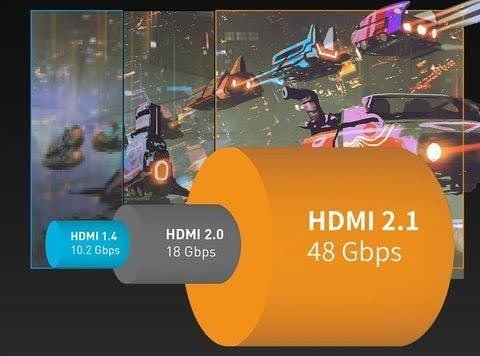
Choosing the right hdmi standard is essential for enjoying high-quality entertainment, smooth gaming, and reliable connectivity between modern devices. Hdmi technology continues to improve, offering better resolutions, faster refresh rates, and enhanced audio and video performance. When comparing hdmi 2.0 vs 2.1, understanding their differences can help consumers select the right cables and compatible devices for their needs. Hdmi 2.0 supports many everyday entertainment requirements, while hdmi 2.1 introduces advanced features designed for modern televisions, gaming consoles, and high-performance displays. Additionally, accessories such as usb c to hdmi adapters make it easier to connect laptops, tablets, and smartphones to external screens. Understanding these technologies helps users make informed purchasing decisions and avoid unnecessary expenses.
Understanding the Basics of HDMI 2.0 vs 2.1
Hdmi 2.0 and hdmi 2.1 are standards developed to improve digital audio and video transmission. Both support high-definition entertainment, but they offer different performance capabilities. Hdmi 2.0 provides a maximum bandwidth of 18 Gbps, making it suitable for 4K resolution at up to 60Hz. In comparison, Hdmi 2.1 supports bandwidth of up to 48 Gbps, allowing compatible devices to deliver 4K at 120Hz and 8K at 60Hz. These improvements make hdmi 2.1 particularly useful for users who want smoother visuals and better performance from modern entertainment systems.
Key Performance Differences Between HDMI 2.0 and 2.1
The most noticeable difference between these standards is their bandwidth capacity and support for advanced display features. Hdmi 2.0 works well for streaming, watching movies, and everyday computer use. However, Hdmi 2.1 offers additional capabilities for demanding applications. Its higher bandwidth supports advanced video formats and improved gaming performance. Features such as Dynamic HDR provide enhanced picture quality, while eARC allows compatible devices to transmit high-quality audio. These improvements create a more immersive entertainment experience for users with supported televisions, sound systems, and gaming equipment.
Why HDMI 2.1 Is Important for Modern Gaming
Gaming is one of the biggest reasons consumers consider upgrading to hdmi 2.1. Modern gaming consoles and powerful computers can benefit from higher refresh rates, reduced screen tearing, and smoother gameplay. Hdmi 2.1 supports several useful gaming technologies.
Variable Refresh Rate (VRR): Helps reduce screen tearing and visual interruptions.
Auto Low Latency Mode (ALLM): Automatically activates low-latency settings on compatible displays.
Quick Frame Transport (QFT): Helps reduce display latency.
4K at 120Hz: Provides smoother motion and improved responsiveness.
These features make hdmi 2.1 an excellent option for serious gamers who want better visual performance and more responsive gameplay.
Choosing the Right HDMI Standard for Your Devices
Selecting between hdmi 2.0 and hdmi 2.1 depends on your equipment, entertainment preferences, and budget. Hdmi 2.0 remains a practical choice for standard 4K televisions, streaming devices, and office monitors. However, Hdmi 2.1 is a better investment for users with newer gaming consoles, high-refresh-rate monitors, and advanced home theater systems. Before purchasing a cable, check the specifications of your television and connected devices to ensure compatibility. Buying a more advanced cable does not automatically upgrade an older device’s capabilities.
How USB C to HDMI Supports Modern Connectivity
USB C to hdmi adapters provide another convenient way to connect compatible devices to external displays. They allow users to connect laptops, tablets, and smartphones with USB-C video output to televisions, projectors, and monitors through hdmi connections. This is particularly useful for presentations, remote working, watching videos, and multitasking. However, users should check whether their USB-C port supports DisplayPort Alt Mode or another compatible video-output technology. Adapter specifications also matter because supported resolution and refresh rates depend on the adapter and connected devices. Choosing a suitable usb c to hdmi adapter ensures reliable connectivity and better display performance.
Significance of HDMI 2.0 vs 2.1 When Buying Accessories
Understanding hdmi 2.0 vs 2.1 is important because it helps consumers choose accessories that match their actual requirements. Purchasing the wrong cable or adapter may prevent users from enjoying the full capabilities of their displays. Hdmi 2.0 offers sufficient performance for everyday entertainment, while hdmi 2.1 provides greater bandwidth and advanced features for demanding applications. Consumers should consider device compatibility, display resolution, refresh rates, and future upgrade plans before making a purchase. This knowledge helps avoid unnecessary spending while ensuring a dependable entertainment and connectivity setup.
Conclusion
Hdmi 2.0 and hdmi 2.1 both provide reliable digital connectivity, but their capabilities serve different purposes. Hdmi 2.0 is suitable for everyday streaming, office work, and standard 4K entertainment, whereas hdmi 2.1 offers higher bandwidth, advanced gaming features, and support for higher refresh rates. Choosing the right standard depends on your devices and performance expectations. Additionally, USB C to hdmi adapters provide convenient connectivity for compatible modern devices. By understanding these differences, consumers can select suitable accessories and enjoy better audio, video, and overall device performance.
Frequently Asked Questions (FAQs)
1. What is the main difference between HDMI 2.0 and HDMI 2.1?
The main difference is bandwidth. Hdmi 2.0 supports up to 18 Gbps, while hdmi 2.1 supports up to 48 Gbps.
2. Is HDMI 2.1 better than HDMI 2.0 for gaming?
Yes. Hdmi 2.1 supports features such as VRR, ALLM, and 4K at 120Hz, making it better for compatible gaming systems.
3. Can an HDMI 2.1 cable work with an HDMI 2.0 television?
Yes. Hdmi is backward compatible, so an HDMI 2.1 cable can work with an hdmi 2.0 television, although performance will be limited by the older device.
4. Do I need HDMI 2.1 for a 4K television?
No. Hdmi 2.0 supports 4K at 60Hz. Hdmi 2.1 is beneficial when you need features such as 4K at 120Hz.
5. Can USB C to HDMI support 4K resolution?
Yes. Compatible USB-C devices and suitable adapters can support 4K output, depending on their specifications and supported refresh rates.
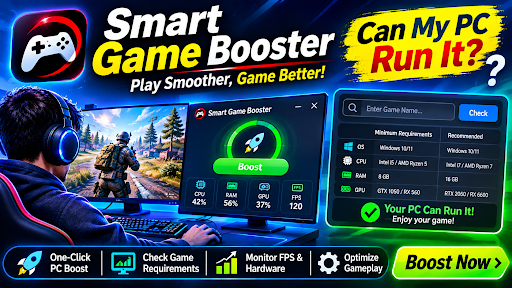
Imagine downloading a new PC game, adjusting its graphics settings, and discovering that the experience is still not what you expected. Perhaps the game takes too long to respond, background programs consume valuable resources, or your graphics card struggles with demanding scenes. Before replacing hardware or spending money on additional software, it is worth examining what your computer can actually handle. Smart Game Booster brings together gaming optimization and hardware compatibility tools, including a useful feature for answering the question: Can my PC run it?
A Gaming Utility That Does More Than Launch Games
Smart Game Booster is designed for Windows users who want additional control over their gaming environment. Rather than functioning as a simple game launcher, it combines several utilities for managing system performance, maintaining drivers, checking compatibility, and monitoring hardware.
One useful feature is automatic game detection. The application can identify installed games, while users can manually add a local game if it does not appear in the list.
This makes it easier to organize supported titles and access their available optimization settings from one interface.
Give Background Applications Less Room to Interfere
A computer running a demanding game has to divide its resources between multiple activities. A browser with several open tabs, unnecessary startup applications, and background utilities can consume memory and processor capacity.
Smart Game Booster addresses this through its PC Boost feature. It provides controls for closing selected background applications and applying supported system adjustments before gameplay.
For gamers who prefer fewer manual steps, its Auto Boost feature can automatically detect game launches and activate the selected gaming settings.
Here are some practical advantages:
- Manage selected background applications before launching games.
- Reduce unnecessary system activity during gaming sessions.
- Access different boosting configurations according to your needs.
- Restore normal settings after completing a gaming session.
- Use additional performance options through supported premium editions.
The important advantage is convenience rather than a guaranteed FPS increase. A computer with limited graphics hardware will still have its original hardware limitations, even after optimization.
Can my PC run it? Find Compatible Games Before Installing
Choosing a game can be difficult when its requirements are unfamiliar. A title might look interesting, but its graphics requirements could be considerably higher than what your computer supports.
Smart Game Booster includes a dedicated Can I Run It section that helps users compare their PC hardware with the minimum and recommended requirements of individual games.
You can search for a game and examine whether your system meets its published specifications. There is also an option to browse games that your computer can run.
This feature is particularly useful when exploring unfamiliar titles or planning a future hardware upgrade.
Why the Can my PC run it Checker Matters
Check before downloading: Avoid spending time downloading large games before reviewing their hardware requirements.
Understand your hardware: See whether your processor, graphics card, and RAM meet the selected game’s specifications.
Explore suitable titles: Find games that match your current computer configuration.
Plan upgrades intelligently: Identify components that may need attention before purchasing replacement hardware.
Understand performance expectations: Compare minimum and recommended requirements instead of relying on guesses.
Passing a minimum requirements check does not guarantee smooth gameplay at maximum graphics settings. Resolution, drivers, cooling, and game optimization still influence the actual experience.
Monitor What Happens Inside Your PC During Gameplay
A game can become unstable for reasons that are not immediately obvious. High temperatures, excessive memory usage, or changing hardware loads may influence the overall experience.
Smart Game Booster includes a real-time monitoring panel that displays hardware information, resource consumption, and temperature readings. An in-game HUD can also show FPS and hardware temperatures without requiring users to leave their game.
Its temperature alerts can help draw attention to monitored hardware components when they exceed configured thresholds.
This information gives players a more practical way to investigate performance issues instead of immediately assuming that their graphics card needs replacing.
Explore More Than Basic Game Optimization
Another interesting part of the application is its additional maintenance and protection functionality.
The Performance section provides tools for cleaning and adjusting the PC, updating graphics and audio drivers, and defragmenting game files.
Smart Game Booster also includes Guard features for security-related checks, game account protection, and system diagnosis.
These additional options make the application useful for users who want to manage several gaming-related tasks through one program.
Free Access or Premium Gaming Features?
Smart Game Booster offers Free, VIP, and SVIP account options.
The free edition includes basic boosting and manual driver updates. VIP adds more advanced functionality, while SVIP includes additional features such as Network Acceleration.
Before purchasing a subscription, review the current feature comparison and decide whether the additional options are genuinely useful for your gaming habits.
Final Verdict: Is Smart Game Booster Worth Trying?
Smart Game Booster offers a combination of system optimization, game compatibility checking, driver management, and hardware monitoring in one Windows application.
Its built-in Can my PC run it feature is especially useful for gamers who want to examine game requirements before downloading new titles. Meanwhile, PC Boost and real-time monitoring provide additional ways to manage and understand system performance.
For PC gamers who prefer having these tools together instead of searching for separate utilities, Smart Game Booster is worth exploring. The best approach is to test its available features, compare performance under similar conditions, and choose settings that suit your actual hardware.

What Puppy Training Really Looks Like in a Big City

Save Story Online: 9 Best Instagram Story Downloaders for 2026

Why Hoodie Design Is More Complicated Than It Looks: Construction, Weight, and Fit Explained

Who Is Keiko Fujimoto? All About Sunny Balwani’s Former Wife

Bandit Lee Way: Everything to Know About Gerard Way and Lyn-Z’s Daughter

Meet David Scott Simon: Alison Berns’ Husband and His Private Life
-
 Celebrity3 months ago
Who Is Keiko Fujimoto? All About Sunny Balwani’s Former Wife
-
 Celebrity3 months ago
Bandit Lee Way: Everything to Know About Gerard Way and Lyn-Z’s Daughter
-
 News3 months ago
Meet David Scott Simon: Alison Berns’ Husband and His Private Life
-

 Celebrity3 months ago
Who Is Fred Tillman? The Full Story of Kelly McGillis’s Former Husband
-

 News4 months ago
Meet Carol Marlow: The Full Story of Tony Dow’s Private Ex Wife
-

 News3 months ago
Meet Morgan Kay Beamer: The Todd Beamer’s Daughter
-

 Celebrity2 months ago
Who Is Alice Young? Meet Neil deGrasse Tyson’s Wife
-

 Celebrity3 months ago
Meet Kelly Stewart-Harcourt: The Story of Jimmy Stewart’s Daughter