
Technology
AI Video Generator: Innovative Technology to Create Engaging Videos From Ideas


A good feature of an ai video generator App like Dreamina is that you could create a travel clip, a video ad, or an edu-entertain social post with AI. An adios learn-educate-entertain social video post using AI. In essence, you don’t need to spend hours storyboarding each shot and then trying to clip everything in; you could do high-quality video easily with these intelligent video editing tools.
Video Production, redefined
Normal filmmaking is such a long and tedious job, including preparing the shots, filming, editing, adding music, putting in visual effects, a nd so on, which takes quite a lot of time and even some filming equipment. But, with the emergence of AI technology, the normal way of producing videos is changing very rapidly. Now you only need a text prompt or simply a photo to be able to make a video, but it just needs to tell the picture what the actor in it sees – that is, you think of a picture and describe it to the computer, and it will create a short video of what is seen in it. But keep in mind that the traditional way of producing videos will not disappear; it will just be a new technique and even a new and fun way for not only filmmakers but also amateurs to make movies, instead of wasting hours making one.
Achieve Better Results With Improved Prompts
One of the most crucial elements in optimizing AI outputs is learning to craft your queries. For example, the AI might take “a person walking” as its cue, and that is a very simplistic image. It is much more engaging when you add more details such as “a young backpacker walking through a still, forested track at dusk, with the last rays of sun streaming between the trees”.
People might also be able to select for the different types of shots, things the leading character may be doing, other objects in a shot, and even what type of environment a shot will be displaying. The subtle details are what enable a creator to create a distinctive image.
Understand Movements of Camera and Scene Composition
Camera movement can be a factor in the structure of a piece of cinematography as well as the audience’s understanding of the scenes. It may seem inconsequential, but a camera that slowly focuses in on a very important object provides a feeling of emphasis, and sweeping shots broaden out to allow for the setting around the part of the world that the character has been walking into to be revealed. Close-ups can help establish that the character is emotionally invested in this moment, while wide shots can help you establish that there is more going on than the character is aware of.
For instance, videos created with artificial intelligence can do different types of camera work depending on what you tell it about. Please also remember not to include too many different movements in one prompt, as this may result in unwanted results. In many cases, a simple prompt with a concise scene description will serve as the best starting point for you.
Conclusion
It’s such a formidable AI in video generation that it’s changing the way in which we’ll work together to create and deliver images for visual storytelling. User-centric tools is feasible that allows experiment it is with ideas in textual content, elevate alone art work the use of all variety, making out exciting scenes for the several reasons with several models, whatever you want to create movies on travel and coaching., business commercials, or some enjoyable clip for Facebook or Twitter, there are endless possibilities with those varieties of synthetic intelligence technologies. Regardless, creating working to not need capability human work to consist of planning, opting for specific guidance, to edit, and further to consciousness on the smallest details. Synthetic clever techniques that require the paintings of tens of millions of programmers and human creativity are often the way to production of persuasive, compelling have the same impact to maximize the effect on the audience.
Frequently Asked Questions
1. What Is an AI Video Generator?
Video creation AI tool: Is a machine learning tool that you can use to generate any video content that will prompt or images or text inputs. This tool can also be used to create visual work without the need to perform and record all scenes.
2. Are Videos Made From Text Possible?
Yes. There are many systems on the market that allow you to convert any text to a video. You simply describe in words the scene that you desire, the set, the objects, the lights, even the movements,s and the machine will generate a video clip based on that description.
3. Can I Convert a Picture Into a Video?
Absolutely. Users can take a still photo and, using an image-to-video function, the platform can convert that still into a short video.


Nothing disrupts a cold evening quite like a boiler that refuses to cooperate. One minute you’re enjoying a warm living room, and the next you’re reaching for extra blankets because the heat just cut out. If this sounds familiar, you’re not alone — boiler issues are one of the most common reasons homeowners call for emergency heating help during the colder months.
At Schwantes Heating and Air Conditioning, Inc., we understand how frustrating a malfunctioning boiler can be, especially when you least expect it. A reliable heating system isn’t a luxury; it’s a necessity for comfort, safety, and peace of mind. That’s why understanding how your boiler works, recognizing early warning signs, and knowing when to call a professional can save you from a much bigger headache down the road.
In this post, we’ll walk through the most common boiler problems, how to spot them before they escalate, and why trusting an experienced team can make all the difference in restoring comfort to your home quickly and efficiently.
What Are the Most Common Signs Your Boiler Needs Attention?
Boilers are built to last, but like any mechanical system, they show signs of wear over time. Catching these signs early can prevent a minor issue from turning into a costly breakdown.
Unusual noises. Banging, whistling, or gurgling sounds coming from your boiler often indicate trapped air, mineral buildup, or a failing component. These sounds shouldn’t be ignored, even if your heating still seems to be working fine.
Inconsistent heating. If some rooms feel warm while others stay cold, your boiler may be struggling to circulate heat evenly. This is often tied to issues with the pump, thermostat, or internal valves.
Rising energy bills. A boiler that’s losing efficiency has to work harder to produce the same amount of heat, which shows up directly on your utility bill. If your costs are climbing without an obvious explanation, your boiler could be the culprit.
Leaks or visible corrosion. Water pooling near your boiler or rust forming on its exterior are clear indicators that something isn’t right internally. These issues tend to worsen quickly if left unaddressed.
Pilot light changes. A pilot light that frequently goes out or burns a different color than usual can signal ventilation problems or gas supply issues, both of which require prompt professional evaluation.
How Often Should Boilers Be Inspected and Maintained?
Routine maintenance is one of the simplest ways to extend the life of your boiler and avoid unexpected failures. Most manufacturers and heating professionals recommend having your boiler inspected at least once a year, ideally before the start of the heating season.
During a maintenance visit, a technician will typically check for:
- Proper water pressure and temperature settings
- Signs of corrosion or mineral buildup inside the system
- Efficient combustion and ventilation
- Thermostat accuracy and calibration
- Wear on seals, valves, and other moving parts
Skipping annual maintenance might save a little time upfront, but it often leads to higher repair costs and shorter equipment lifespan. A well-maintained boiler not only performs better but also uses less energy, which translates into real savings over the life of the unit.
Can a Minor Boiler Issue Turn Into a Major Problem?
Yes, and this is one of the most important things homeowners should understand about boiler care. Many serious boiler failures start as small, seemingly insignificant issues. A slow leak, for example, might not seem urgent at first, but over time it can lead to pressure loss, corrosion, and even complete system failure.
Similarly, a thermostat that’s slightly miscalibrated might just seem like an annoyance when your home runs a bit warmer or cooler than expected. Left unchecked, though, it can cause your boiler to cycle inefficiently, putting unnecessary strain on internal components and shortening the system’s overall lifespan.
The takeaway here is simple: addressing small problems early almost always costs less — in both time and money — than waiting until the system fails entirely.
What Should You Do If Your Boiler Stops Working Suddenly?
A sudden boiler shutdown can feel alarming, especially during the winter months, but a few quick checks can help you determine your next steps before calling for professional support.
First, check your thermostat settings to confirm it’s calling for heat and that the batteries (if applicable) aren’t dead. Next, look at your boiler’s pressure gauge. Most residential boilers operate best within a pressure range of 1 to 1.5 bar; anything significantly outside this range could explain the shutdown. Finally, check your circuit breaker, as a tripped breaker is a surprisingly common and easily fixable cause of boiler outages.
If these basic checks don’t resolve the issue, it’s time to bring in a professional rather than attempting a DIY fix. Boilers involve gas lines, high-pressure components, and electrical systems, and incorrect handling can create safety risks for you and your home.
Why Choose Professional Help for Your Heating System?
Dependable Boiler Repair that keeps your family warm all season long starts with choosing a team you can trust. At Schwantes Heating and Air Conditioning, Inc., our technicians bring years of hands-on experience diagnosing and resolving boiler issues of all kinds, from minor pressure adjustments to complete system overhauls.
We know that heating emergencies rarely happen at a convenient time, which is why we prioritize fast, reliable service designed to get your home back to a comfortable temperature as quickly as possible. Our team takes the time to explain what’s happening with your system, walk you through your repair options, and recommend solutions that fit both your comfort needs and your budget.
Beyond repairs, we also offer maintenance plans designed to catch small issues before they become expensive problems. Investing in regular upkeep not only extends the life of your boiler but also helps keep your energy bills in check throughout the year.
Keep Your Home Comfortable All Year Round
A well-functioning boiler plays a central role in keeping your home comfortable, especially as temperatures drop. By staying alert to warning signs, scheduling routine maintenance, and acting quickly when something feels off, you can avoid the stress and expense of a major breakdown.
If your boiler has been acting up, or if it’s simply been a while since your last inspection, don’t wait for a cold morning to find out something’s wrong. Reach out to Schwantes Heating and Air Conditioning, Inc. today, and let our experienced team help you restore comfort and confidence in your home’s heating system.

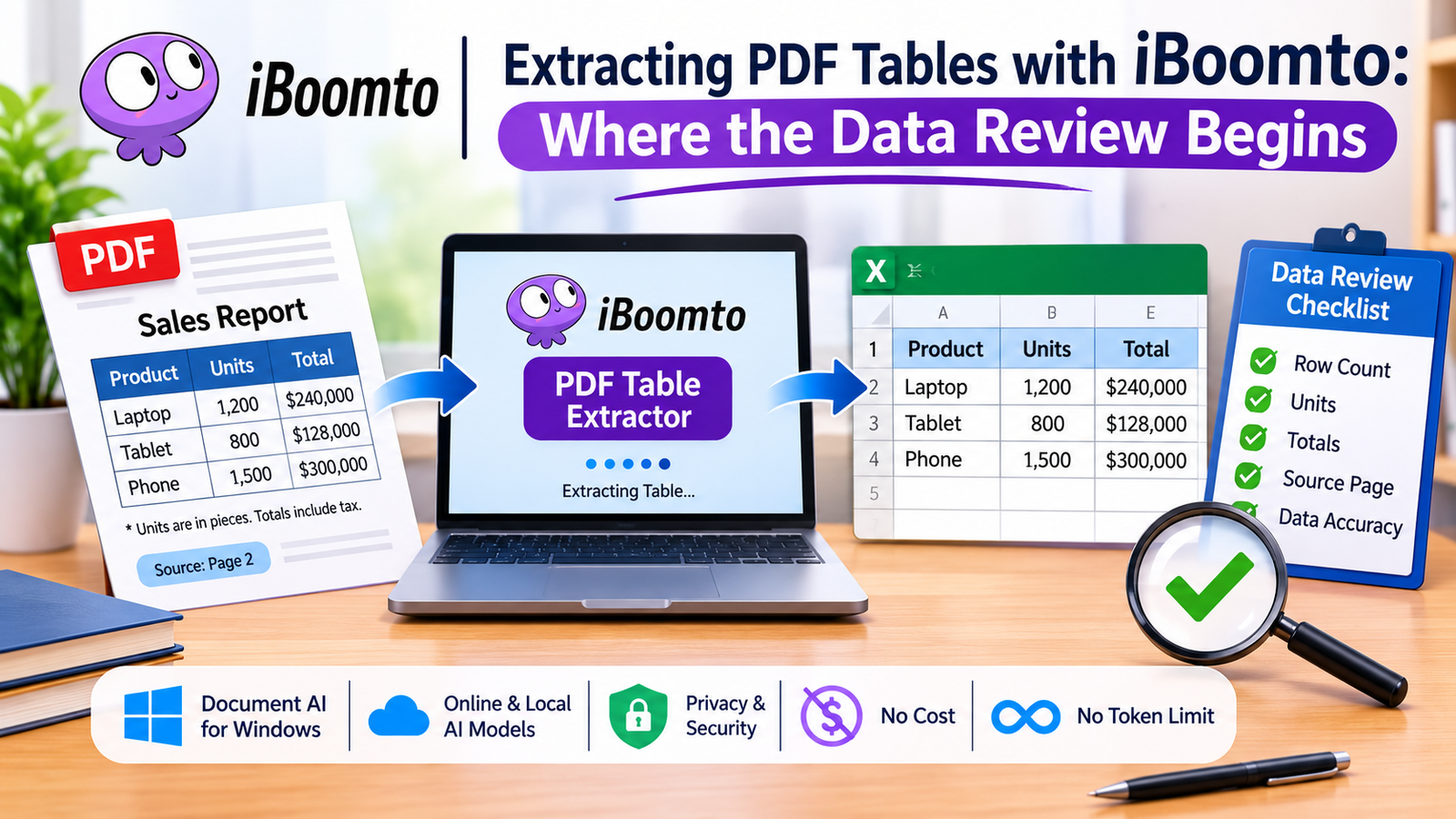
It’s very useful in many instances to be able to extract information from a PDF report in the form of rows and columns (financial statements, research papers, business reports, academic papers, etc.). The problem arises if you’re going to use that information in another application and the original PDF isn’t easily editable.
A PDF table extractor can do a lot to make this much easier by taking the structured data and converting it into a format that’s far more useful. One thing to be aware of is that the data in a table doesn’t necessarily have to be correct just because it’s been extracted. If you’re going to use any of the data you’ve extracted from a table in a report, a spreadsheet, or a presentation, you absolutely must verify it.
This is where the real action begins!
Introducing iBoomto for PDF Table Extraction
iBoomto is a document AI that’s designed to help you process documents and manage information as part of your day-to-day use on Windows. It can be used with either a web-based AI or a local AI model, depending on what you’re trying to do, your level of internet connectivity, and your preference for where the processing is done.
It has a PDF Table Extractor which allows you to extract the tabular data from a PDF document without having to manually copy each row. Once the data has been extracted, you can then go through it and tidy it up for future use.
Another interesting aspect of it is the level of privacy and security it offers. Depending on the nature of the documents you’re processing, you can select the appropriate processing workflow. iBoomto also offers a free option, which is ideal for students, researchers, and professionals who are regularly working with documentation.
Step 1: Capture the Table from Your PDF
Firstly, pick the PDF that has the table you’re after. Head over to iBoomto’s PDF Table Extractor, upload your PDF file, and the tool will detect and extract the information from the tables.
After extraction, check what results are available and copy and paste them into your preferred spreadsheet.
Don’t go assuming that everything’s been perfectly captured at this stage. The original PDF is the reference point to check all the information you’ve extracted.
Step 2: Compare the Row and Column Counts
The easiest way to spot any extraction problems is to look at the number of rows and columns.
For example, a table with 15 rows of data might end up with only 14 in your spreadsheet. If a column is missing or the header is incorrectly separated, then the data can be completely misinterpreted.
Check the following:
– Are all the original data rows in the spreadsheet?
– Do the column headings contain all the information that’s required?
– Is there any duplication of rows?
– Do you think the blank cells are displayed correctly?
– Is there a separation between the table heading and the data?
This simple comparison could flag a problem prior to it having any impact on any other calculations.
Step 3: Verify Units and Measurements
Numbers without units are meaningless.
In a financial report, you might have figures in thousands of dollars; in a research paper, you might have percentages, kilograms, and so on. If that information is left out during the extraction process, the spreadsheet may not be right.
Always refer to the original table and notes! Have the unit labels on the column headings or include a separate notes section to explain them.
For example, if the revenue is actually in dollars (thousands), whether that be US dollars or otherwise, the line will be “Revenue (USD, thousands)”.
Step 4: Check Totals and Calculations
Another good way of spotting potential extraction errors is via the totals.
When there are individual values in a table along with a total, compare the total that you’ve extracted with the original total. If it’s appropriate, derive the sum of the individual rows that you’ve extracted separately.
If you’re looking at a report and you’re given a monthly total and a yearly total, just make sure that the monthly total is a sensible approximation of the yearly total.
Keep in mind there could be some differences arising from rounding, exclusions, taxes, and the various other adjustments noted in the source. Don’t assume that every single mismatch is an extraction error.
Step 5: Record the Original Source Page
It’s very handy for the reader to be able to trace the information in the spreadsheet back to the original document.
Write the PDF Filename, page number, table title, and reporting period. If you’re pulling multiple tables from a single report, then please label each table with a good source reference.
This is particularly pertinent for information researchers and information workers who are constantly having to pull information from a number of different documents. A page reference is very useful in terms of saving time and streamlining the review process when you need to go back and check a particular figure at a later date.
Step 6: Continue Reviewing Your Documents
Table extraction is generally part of a bigger documentation project. You may well be required to rephrase the original report, translate PDFs into Markdown, collate reference notes, or produce information for some other project.
That’s where iBoomto’s more extensive Document AI features come into their own. It has a Windows app which can be used with AI models that are either available online or installed locally, giving the user the flexibility to do their documentation work in the way that suits them.
Not having to pay for a subscription or pay per token to use it makes it very easy for normal document-related use.
Conclusion
Whilst PDF table extraction can save you a bit of time, it’s not sufficient simply to convert the PDF into a table through AI Document Assistant. You have to be sure that the data is sound. You need to be aware of the row numbers, the column headings, the units, the totals, and the original page numbers before you go any further and use the data elsewhere.
iBoomto provides a good environment in which to capture table data, and with a careful eyeball review you can be confident that the data extracted is both meaningful and accurate.
The key point is that extraction gets the data into your hands; verification gets it into your fingertips.


The internet is becoming a necessary component of daily life. People use it for communication, online shopping, entertainment, education, business, and accessing information. However, spending time online also comes with privacy and security concerns. Websites may collect browsing information, public Wi-Fi networks can expose sensitive data, and some online services restrict access based on location. This is why virtual private networks (VPNs) have become increasingly popular. A tool such as iTop VPN can help users improve their online privacy while providing a convenient way to explore the internet.
For people who want to explore VPN technology without immediately paying for a subscription, a VPN free option can be a useful starting point. Understanding how these services work and what features they offer can help users make better decisions about their online security.
Understanding How a VPN Protects Your Privacy
A virtual private network creates an encrypted connection between your device and a VPN server. Instead of sending internet traffic directly through your regular connection, a VPN routes it through a selected server. This process helps protect your data from certain types of monitoring and makes your visible IP address appear different from your original one.
Encryption is particularly useful when connecting to public Wi-Fi in places such as airports, hotels, restaurants, and coffee shops. These networks are convenient, but they may not always provide sufficient protection. A VPN adds another layer of security by encrypting supported internet traffic.
However, users should remember that a VPN does not provide complete anonymity or protect against every online threat. Safe browsing habits, strong passwords, and updated software remain important.
What Makes iTop VPN Worth Exploring?
iTop VPN is designed to provide a straightforward VPN experience for people who want additional privacy and flexibility while browsing. Its user-friendly approach makes it suitable for individuals who may not have extensive technical knowledge.
One important consideration when choosing a VPN is ease of use. Complicated settings can make it difficult for beginners to understand how to connect securely. A simple interface allows users to explore available servers, establish connections, and manage their preferences without unnecessary steps.
Another useful consideration is server availability. Different server locations can provide additional flexibility when accessing websites and online services. Depending on the available servers and service conditions, users may be able to connect through locations in different countries.
Exploring a VPN Free Option
Many internet users search for a VPN free service because they want to understand the benefits of a virtual private network before spending money. Free access can make VPN technology more accessible, especially for students, casual browsers, and people who only need occasional protection.
A free VPN option may provide basic connectivity and an opportunity to test the software interface. It can also help new users understand how server selection, connection settings, and encrypted browsing work.
Nevertheless, free services can come with limitations. These may include restricted server locations, connection limits, reduced speeds, or fewer advanced features. Availability and restrictions depend on the provider and its current plans.
When evaluating a free VPN, users should also examine its privacy policy. A trustworthy service should explain how it handles personal information, connection records, and other data. Free access should never mean giving up reasonable privacy protections.
Benefits of Using iTop VPN for Everyday Browsing
There are several reasons why users may consider adding a VPN to their daily internet routine.
1. Additional Connection Privacy
A VPN encrypts supported internet traffic between your device and the VPN server. This can make it more difficult for others on the same local network to inspect your browsing activity. It is particularly useful when using unfamiliar public Wi-Fi connections.
2. Flexible Server Connections
Server selection is another important VPN feature. Connecting through different server locations can help users access location-dependent online content, subject to the relevant website’s rules and restrictions.
3. A Beginner-Friendly Experience
A straightforward interface can make a significant difference for first-time VPN users. Instead of dealing with complicated technical configurations, users can focus on selecting a server and establishing a connection.
4. More Control Over Online Activities
A VPN gives users another way to manage their internet connections. Whether browsing websites, reading online articles, or accessing personal accounts, an encrypted connection can add a useful privacy layer.
5. Options for Different Requirements
Some users need a VPN occasionally, while others prefer having it available throughout the day. Exploring the available plans and features helps users decide which option best matches their browsing habits.
How to Get Started with iTop VPN
Getting started with a VPN does not have to be complicated. Users can follow a few basic steps to explore the service.
First, visit the official iTop VPN website and review the available software versions. Download the appropriate version for your operating system and complete the installation process.
Next, open the application and explore its interface. Review the available server locations and connection options before selecting a suitable server.
Once connected, check that the VPN connection is active. You can also visit an IP-checking website to see whether your visible IP address reflects the selected VPN server.
Finally, review the application’s privacy and security settings. Understanding the available options can help you use the service more effectively.
What Should You Consider Before Choosing a VPN?
Choosing a VPN requires more than looking at its price or number of advertised servers. Privacy practices, performance, reliability, and customer support are equally important.
Start by checking the provider’s privacy policy. Look for clear information about data collection, retention, and sharing practices. A transparent policy helps users understand what happens to their information.
Connection speed is another factor. VPN encryption and server distance can influence browsing performance. Testing different available servers may help identify a suitable connection.
You should also consider device compatibility. If you regularly switch between a computer and mobile phone, check whether the service supports the devices you use.
Finally, compare free and paid features. A VPN free plan may be sufficient for occasional browsing, while users with more demanding requirements may prefer a subscription offering additional capabilities.
Final Thoughts
Online privacy deserves attention as internet usage continues to grow. A virtual private network can provide an additional layer of protection by encrypting supported traffic and routing connections through remote servers.
iTop VPN offers an option worth exploring for users interested in convenient VPN connectivity and greater control over their browsing experience. Meanwhile, a VPN free option can help beginners understand VPN technology and evaluate basic features before deciding whether a paid plan is necessary.
The best approach is to compare available features, understand privacy policies, and select a service that matches your requirements. With informed choices and responsible browsing habits, you can enjoy a more private and flexible online experience.

Why Stay Cool HVAC Is Florida’s Go-To Choice for Air Conditioning Service

Is Your Roof Ready for Another Winter? Signs You Need a Replacement

Elevate Every Room with Tile Experts from Roma Tiles in New York

Who Is Keiko Fujimoto? All About Sunny Balwani’s Former Wife

Bandit Lee Way: Everything to Know About Gerard Way and Lyn-Z’s Daughter

Meet David Scott Simon: Alison Berns’ Husband and His Private Life
-
 Celebrity3 months ago
Who Is Keiko Fujimoto? All About Sunny Balwani’s Former Wife
-
 Celebrity3 months ago
Bandit Lee Way: Everything to Know About Gerard Way and Lyn-Z’s Daughter
-
 News3 months ago
Meet David Scott Simon: Alison Berns’ Husband and His Private Life
-

 Celebrity3 months ago
Who Is Fred Tillman? The Full Story of Kelly McGillis’s Former Husband
-

 News4 months ago
Meet Carol Marlow: The Full Story of Tony Dow’s Private Ex Wife
-

 News3 months ago
Meet Morgan Kay Beamer: The Todd Beamer’s Daughter
-

 Celebrity3 months ago
Who Is Alice Young? Meet Neil deGrasse Tyson’s Wife
-

 Celebrity3 months ago
Meet Kelly Stewart-Harcourt: The Story of Jimmy Stewart’s Daughter